SecOps
Production AI Playbook: Human Oversight

This post is part of a series that explores strategies, shares best practices, and provides practical examples for building reliable AI systems in n8n. Find out when new topics are added via RSS, LinkedIn or X.
You built an AI agent that drafts emails, summarizes support tickets, and updates your CRM. It works flawlessly in testing. Then you deploy it to production, and suddenly you’re explaining to your VP of Sales why a prospect received a reply promising a 90% discount that doesn’t exist.
The technology is capable, but capability without oversight is a liability. Every team deploying AI into workflows that touch customers, data, or decisions eventually hits the same realization: you need a way to keep humans in the loop without killing the speed that made automation worthwhile in the first place.
The good news is that human oversight doesn’t mean babysitting every AI output. It means building workflows where humans step in at the moments that matter and letting automation handle the rest. Done right, you get the best of both worlds. The throughput of AI with the judgment of your team.
This post shows you how to design human oversight into your AI workflows, with real examples you can apply today.
Let’s be clear about what we’re solving for. Human oversight in AI workflows comes down to designing systems that match how your business actually operates. Most decisions in an organization aren’t fully autonomous, and they shouldn’t be. Contracts get reviewed. Budgets get approved. Communications get checked. AI workflows should work the same way.
In practice, human oversight means inserting decision points into automated workflows where a person can review, approve, modify, or reject what the AI has produced before the workflow continues. The key is making those decision points surgical, placed exactly where human judgment adds value, without creating bottlenecks everywhere else.
There are three scenarios where human oversight consistently proves essential.
High-stakes outputs. Any AI-generated content that reaches customers, partners, or the public. A misclassified support ticket is annoying or may negatively affect the user experience. A misclassified legal document is just a lawsuit waiting to happen. The higher the stakes, the more you need a human checkpoint before execution.
Irreversible actions. This includes database writes, financial transactions, account modifications, and anything you can’t easily undo. If the AI is about to do something permanent and is critical, have a human confirm it first. This type of verification is an industry standard and is critical to build reliable AI systems.
Novel or ambiguous inputs. It is well known that AI models are confident even when they’re wrong. This has led to one of the most common issues of AI systems, known as hallucinations. When inputs fall outside the patterns the model has seen, or when the AI’s confidence score drops below your threshold, routing to a human prevents quiet failures that compound over time.
In n8n, the implementation approach depends on the type of interaction. Here are three patterns that cover the majority of production use cases, each suited to different levels of complexity and team structure.
In the simplest and most direct approach, the AI produces an output, presents it to a human in a chat interface, and waits for approval before proceeding. This works well for conversational workflows, content review, and quick yes/no decisions.
Best for: Single-reviewer scenarios, real-time interactions, and content approval before sending.
How it works in n8n: The Chat node now includes two operations. “Send a message” is fire and forget, while “Send a message and wait for a response” pauses until the human replies. The wait version supports both free text responses and inline approval buttons. You can also add these as tools for an AI Agent, so the agent itself decides when to ask for clarification or send progress updates during long-running tasks.
Several other integrations, like Slack and Telegram, have similar functionality, but we’ll walk through a concrete example using n8n’s built-in Chat node.
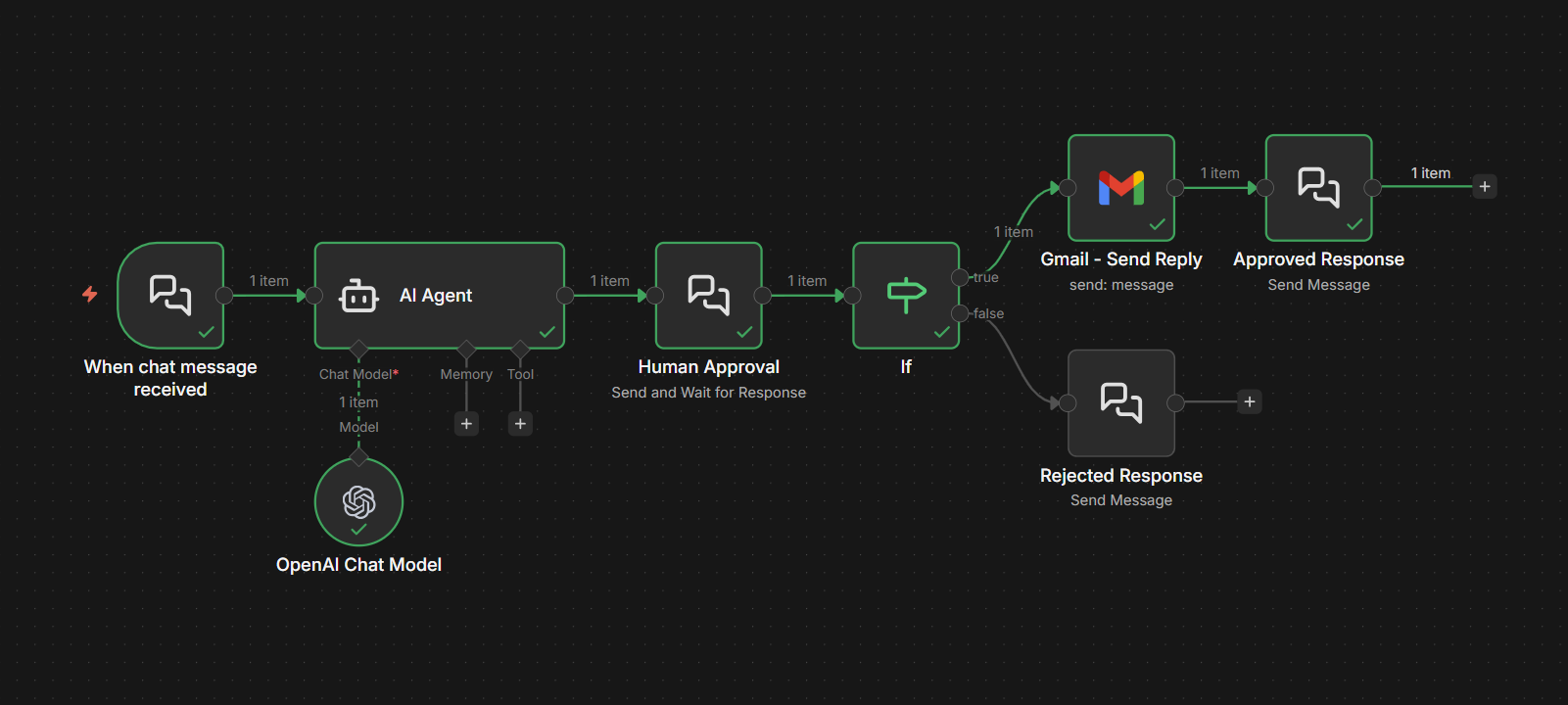
Let’s walk through a concrete example. Say you have an AI agent that handles customer support inquiries. It reads incoming emails, drafts responses using an LLM, and sends them. You want a human to review the draft before it goes out.
Here’s how to build this workflow:
Step 1: Set up the Chat Trigger. Configure a Chat Trigger node with the Response Mode set to “Using Response Nodes.” This tells n8n that response handling will happen through Chat nodes later in the workflow rather than automatically.
Step 2: Process the incoming request. Connect your AI processing steps. Pull the customer email content, run it through your LLM with the appropriate system prompt, and generate the draft response.
Step 3: Present the draft for review. Add a Chat node configured with the “Send and Wait for Response” operation. Set the Response Type to “Approval.” The message should include the original customer inquiry and the AI’s drafted response so the reviewer has full context. Customize the button labels to match your process, something like “Send to Customer” and “Revise.”
Step 4: Branch based on the decision. After the Chat node, add an IF node that checks the approval result. If approved, the workflow proceeds to send the email. If rejected, you can route back to the AI with revision instructions or flag it for manual handling.
💡